Free Marketing Toolkit Opt-in
(02) 42444411 info@ybrmarketing.com.au
Most Asked SEO Questions in 2023

Most Asked SEO Questions in 2023

What is SEO marketing?

SEO stands for search engine optimization, which is the practice of increasing the amount of visitors to a website by ranking higher in search results.

Search engines like Google and Bing use robots to crawl the internet, looking at websites to determine how they should rank them in their search results. SEO marketing is the process of improving a website’s content and code so that it ranks as high as possible in these searches.

When beginning an SEO campaign, marketers need to consider how people search for information online and what search terms they might use when looking for your products or services. More and more consumers are using longer phrases called long-tail keywords when searching online. For example, someone trying to buy a laptop might type “best laptops under $500” into Google rather than simply “laptop.”

Marketers then optimize the website’s content and technical components, such as image tags and headers, so that these keywords appear throughout different parts of the site. This encourages Google’s algorithms to rank that website higher in search results for those keywords. The process is ongoing because what works today may not work tomorrow—search engines are constantly updating their algorithms to provide users with better results.

What is local SEO? What are the benefits of local SEO?

The term local SEO generally refers to the optimization of online marketing campaigns for small, local businesses. It’s a strategy for achieving higher organic rankings for relevant search terms that comes with numerous benefits. First, more traffic can result in more revenue as a result of superior organic ranking within search engine results. On top of that, local SEO allows businesses to target nearby audiences and offers increased trust among potential customers.

Free Standard Professional SEO SOPs

How much should I pay for SEO in 2023?

Your SEO cost will depend on the level of support you need and the size of your business. If you’re just starting out, you might only need one or two people to help you with SEO. On the other hand, if you’re an established company with lots of customers, it might make sense to hire an entire team.

The average SEO cost is $1200 per month. The cheapest SEO packages we offer start at $650/month and go up to $6000/month for larger companies with more complex needs, so there’s something for every budget! For example, if you’re looking for local search engine optimization services our agency charges $650-$2000 per month depending on how competitive your market is from both an organic and paid perspective.

Do you think SEO is still a valid way to get traffic to your website?

SEO, or search engine optimization strategies, are tactics designed to improve your website ranking and visibility on search engine results pages (SERPs). When executed correctly, SEO can be a very effective way to increase organic traffic without having to pay for ads.

SEO is a proven and cost effective marketing strategy, which enables companies to build quality and relevant links to their website. Over time these links can help non-brand aware consumers find your brand, driving more traffic to your site. There are many methods of SEO in order to effectively grow links, such as on-site optimization, quality link building, or social media optimization and promotion.

How many headings in the article should I put the keywords?

Well, it depends on the article. For example, if you are writing a short article about how to build a bookshelf level and put in place, there is no need to put too much headings. The reader will be able to understand what you are talking about quickly. However, if you are writing a longer article on how to build an office building or a hospital, we suggest that you use more than 2 or 3 headings. Why? Each section within the main article should be relatively independent from other sections, so that each heading can incorporate the keywords well.

One of the best ways to create backlinks for free in 2023 is by participating in online communities and forums. Share your knowledge, help others, and you’ll be rewarded with free backlinks.

But remember: creating backlinks for free on a forum can be a time-consuming process if done incorrectly.

What is a good SEO score out of 100? How can I check my website SEO status?

The first thing to know is that there is no such thing as a universal “perfect” score out of 100 when it comes to SEO. In fact, there may be no such thing as a perfect score at all. What matters most is increasing the number of people who visit your site and converting them into paying customers. The higher you can get that number without sacrificing your other goals, the better you will be able to rank in search results.

There are a few different ways to check your website SEO status:

1. Google Search Console

2. Bing Webmaster Tools

3. Moz Free SEO Checkers

4. SEMrush Site Audit Tool

Can deleting posts hurt SEO?

Yes, deleting posts can hurt SEO.

SEO is short for search engine optimization. It’s the art and science of making your website more visible to search engines by targeting keywords, producing quality content, and building backlinks (linking your site to other sites with similar content). When you delete a post or page, it becomes inaccessible to the search engine crawlers that visit your site. When they can’t access the post or page because it’s gone, they alert Google that there’s a broken link on your site. That negatively impacts your SEO score.

The best way to avoid this is to make sure that any posts or pages you want deleted are redirected to another page on your website through a 301 permanent redirect. You can manage redirects in the WordPress admin panel by going to Tools > Redirection and adding the URL of the post or page you’re removing from your site along with the new URL you want it redirected to.

Is it possible to rank #1 for competing keywords in a week?

What if I told you that you could rank #1 for your desired keyword in a week? Is it possible?

While it’s not impossible to rank #1 on Google in a week, we should first discuss what this means. Google is the most widely used search engine in the world, accounting for about 90% of all searches. For this reason, “rank #1 on Google” can be taken to mean “appear at the top of the first page of results when someone searches for your keyword.”

This is difficult because Google changes its algorithms frequently, and competitors are always updating their content and staying competitive. In fact, according to Backlinko’s study of 1 million Google search results, it takes an average of 3.8 months for a given page to reach the top 10 search result positions for a specific keyword.

While there are ways to speed up this process—such as through high-quality content and well-placed backlinks—nothing can guarantee ranking #1 on a search engine in just one week.

A lot of factors go into where you land on search engines (including things such as your geographic location, what device you’re using, whether or not you’re logged into your account, etc.), so it would be nearly impossible to get ranked in such a short space of time.

How can I find the right keyword?

The most important part of finding the right keyword is to understand what it is you want to rank for. Do you want to come up in the search results when someone searches for “leather jackets”? Or do you want to rank for “leather jackets in Denver”?

Think about where you want to rank, and try searching for it yourself. What results show up? If it’s a local business, does Google Maps dominate the results? How does your competition appear? What are they doing, and how can you do better?

Once you have a sense of what your goal is, it’s time to start doing research. Use all of the available tools: Google’s Keyword Planner in Google Ads, Moz’s Keyword Explorer, Ahrefs’ Keyword Explorer, Ubersuggest or Rank Tracker—the list goes on! The more information you can collect about keywords, particularly their search volume and difficulty, the better prepared you’ll be to select a keyword that perfect keyword!

When should long-tail or short-tail keywords be used to optimize SEO?

Long-tail and short-tail keywords are used to optimize SEO in different ways.

Long-tail keywords are used for more specific searches. For example: “blue down coat with hood” is a long-tail keyword phrase that indicates the searcher is looking for a very specific type of product. These can be particularly useful when you don’t have a high search volume for your product, or if you have a lot of competition. It’s easier to rank highly on a long-tail keyword search because there won’t be as much competition, and by targeting your audience more directly, you’re likely to receive higher quality site traffic.

Short-tail keywords are used for general searches. For example: “coat” is a short-tail keyword that could refer to any kind of coat, so it’s much less likely to convert into sales than the long-tail keyword phrase “blue down coat with hood.” However, short-tail keywords can bring in a lot of traffic and can be useful if you have products that are relevant to lots of different kinds of searches.

How do you select keywords and rank high in a search engine?

Developing a list of keywords that search engines can use to find your site is an essential part of your online marketing strategy. But what exactly are keywords? They’re the terms that customers type into search engines when they look for goods and services. When you research, select, and use keywords properly, you’ll not only increase your visibility on the web, but you’ll also drive more targeted traffic to your site—people who may just turn into new customers.

Here’s how to select keywords that will help you rank high in search results:

-Step 1: Research and analyze. Research other sites in your industry to see what keywords they’ve chosen. Also evaluate how relevant those keywords are to your business. If you sell snowboards, but other sites in your industry use the keyword “skis,” you won’t get much traffic if you choose this term yourself.

-Step 2: Use tools like Google’s AdWords Keyword Planner tool to choose terms that will be most effective at getting you ranked high in search results. You can also try WordStream’s Free Keyword Tool.

-Step 3: Create a plan for implementing them in various areas of your site, including URLs, page titles, headings, content, meta descriptions, and images

In order to rank well in a search engine, you need to know how to select the right keywords. You should select keywords based on their popularity and relevancy; ideally, they should be popular with consumers and relevant to your company’s products or services.

A good keyword is one that potential customers are actively searching for in order to find products like yours.

You can also improve your ranking by making sure that all of your website’s pages have content using relevant, high-performing keywords. You want every page of your site to be linked with a relevant keyword so that search engines can understand what each page is about and rank it accordingly.


Why are SERP features important?

SERP’s is an acronym of Search Engine Results Page. SERP features control what parts of your website appear in the search result, which reduces user clicks to other sites or competitors. They also improve the user experience by giving them a quick snapshot of an answer, rather than forcing them to click through multiple links to find what they want.

SERP features are a vital part of search engine optimization. The most common SERP features currently in use include featured snippets, image packs, local packs, and ads. Each type of SERP feature has its own strengths and weaknesses for the user, and each one is treated differently by the search engine.

They are important because they can add value to your site. The more SERP features you have on your site, the more information Google has about your website.

Your site has different types of content that Google can use for each SERP feature. It could be a blog post or an article that your company wrote, or it could be something from another website that you think can help with your business.

How do you target SERP features?

If you want to improve your visibility in search engines, you need to make sure that you’re targeting SERP features.

SERP features include:

Featured snippets (a box at the very top of the SERP that contains information related to the user’s search)

Knowledge panels (informational panels on the right side of the page)

Maps (maps and listings of local businesses)

Top stories (news articles listed at the top of the page)

Image packs (images from around the internet related to your query)

Video packs (videos from around the internet related to your query)

How do you get these featured spots?

You can target SERP features by using schema markup on your website. Schema is a language that helps Google and other search engines understand what parts of your web page are important.

This type of mark-up can help you to appear in SERP features such as Knowledge Graphs, carousels, top stories, and more.

How do I find low competition keywords for my new channel? 

FREE YouTube Keyword Research tool 

When you’re launching a new channel, you have to make sure you know what keywords to target. If you just throw up your content and start posting, you risk getting buried in the sea of YouTube competitors. So, how do you find the low competition keywords that will help your videos stand out?

Now, there are two ways to approach this:

The first is to look for what’s already popular on YouTube. Use TubeBuddy’s keyword finder tool to search for any top-performing videos. Look at their titles and descriptions and see what they’re doing differently from other videos in the same niche.

The other option is to do a little digging—literally into Google Keyword Planner—and find out what’s already popular with people searching for content on YouTube. You can also try looking at your own website analytics to see what people are searching for on your site that sends them over to YouTube. Once you’ve found some keywords, then it’s time to optimize!

How do you optimize your content for SEO and social media marketing?

Optimizing content for Google, and social media has become a key component of any social media marketing strategy. In order to effectively utilize the three platforms and bring in more traffic, businesses need to understand how they work and how to plug their content into them.

Optimize your content for Google

Google is the largest search engine in the world, so it’s important that your website is indexed by Google’s search algorithm. Content optimized for Google can be found using relevant keywords or phrases. Include your keywords in your title tag and meta description to help Google index your page for those terms. You should also optimize your webpage for mobile devices, as most Google searches are performed on mobile devices.

Follow these tips to optimize your content for Google:

* Make sure you have original and unique content on your website

* Make sure that you have a sitemap on your site that tells Google where all of the pages on your site are located (you can make one with our sitemap generator!)

* Make sure that you include relevant keywords in the page’s Title Tag and Meta Description tag

* Create quality backlinks to increase external traffic to specific pages on your website

Optimize your content for social media

Social media marketing is a rapidly-changing industry, and staying on top of the latest trends and tools can be challenging for most companies. Here are some tips for keeping your social media marketing up to date:

1. When you’re deciding on the type of content to post, keep in mind that certain types of posts tend to perform better than others. For instance, videos, photos with text overlay, and live streaming tend to get the best results.

2. When you’re deciding which social media platform to post on, remember that each platform has a different audience and purpose. For example, Facebook tends to have more family and friend connections, while Twitter tends to have more professional connections.

3. When you’re choosing when to post, remember that you do not want to post too frequently or at odd hours; it’s best to post during peak hours between 10am and 5pm.

4. When you’re determining how often you should be posting new content, keep in mind that it’s best to post about once a week for each social media page that you maintain; this will allow your audience to see new content several times a month rather than having them view the same content multiple times in one day.

Is it worth putting time into SEO for Bing if you’re already optimizing SEO for Google?

If you’ve optimized your SEO for Google, do you need to put time into Bing?

Some businesses are worried that they don’t have the resources to optimize their SEO for Bing. After all, Bing is much smaller than Google. That’s true: Bing doesn’t get as many search queries as Google does. However, if you’re already optimizing your SEO for Google, it’s worth putting some time into Bing optimization as well.

Here’s why:

The purpose of SEO is to help people find your product or service. If someone searches for a keyword on Google and your site isn’t showing up in the top 10 results, they’re not going to be able to find you. But if they search that same keyword on Bing and your site ranks #1-3, they’ll see your site and be able to click through to get the product or service they want. Even though less people search on Bing than on Google, it’s still important to make sure your site shows up in top results for both search engines!

Bing for Business is a free service that allows you to manage your business listing data on Bing.com and sync it with your Google My Business account.

How do I start a Bing for Business account and sync it with Google My Business?

If you have already registered your business on Google My Business, you can connect your accounts and start managing your listings on Bing.com immediately.

The first step is to sign up for a Bing for Business account here .

Once you have signed up, please follow the steps below to connect your Bing for Business account with Google My Business:

– Log in to the Bing for Business portal and go to the Manage Organization page.

– Click on “Add an organization” and enter the email address associated with your Google My Business profile.

– Follow the instructions in the email sent to you by Microsoft.

– When asked, enter your password associated with Google My Business.

After entering your password, you will see a message that says “Congratulations! Your Bing for Business organization was successfully connected to this Google My Business account.”

How important is keyword research when it comes to search engine optimization (SEO)?

Keyword research is a very important component of search engine optimization (SEO). Search engines aim to deliver relevant results to their users, and keywords are often the best way for them to understand what a page is about.

When you’re performing keyword research, you’re looking for high-volume words that people might use when they’re searching for your product or service. These high-volume keywords are often very competitive and difficult to rank on the first page of Google for. However, there’s an entire spectrum of words from “very specific” to “very general” that your customers might use when searching for your product. By focusing on lower-volume but more specific keywords, you can avoid the fierce competition at the top of the SERPs (search engine result pages) and still get traffic from your target audience.

When you do keyword research, you’re looking for words and phrases that tons of people type into search engines like Google, but that don’t have a ton of competition. You want to find those long-tail keywords—the phrases that are specific enough that they are only searched for occasionally, but which have a high conversion rate because when someone does search for them, they’re ready to buy something. A long-tail keyword is a phrase that contains between three and five words, like “how to find a job after college.” It’s more specific than shorter keywords like “jobs” or “college.” Long-tail keywords are better because they’ll bring in more targeted traffic that’s likely to convert into sales or

As a result, long-tailed keywords help sites appear more frequently in searches without driving up their rates, making them an excellent choice for small businesses on a budget who want to maximize their visibility within their industry without going bankrupt trying to do so.

Free Professional Standard “How To” Keyword Research SOP 


Do upper case or lower letters as keywords affect search engine optimization?

There is no difference in how search engines, like Google, Bing, or DuckDuckGo, regard upper- or lowercase letters when indexing and ranking results.

Search engines use “normalization” to convert all terms into lowercase when they index the page. This means that it doesn’t matter what case you use in the URL or title tag—it’s all converted to lowercase.

Therefore, there is no reason to worry about how you capitalize your keywords in web pages and links—they won’t affect your search engine optimization (SEO).

However, if you want to be consistent in your own website’s URLs, it’s a good idea to pick one format and stick with it for all of them.

How does a snippet work?

A snippet is a short piece of text, usually between 1 and 4 sentences long, that can be used for many different purposes. Many companies use them to increase their SEO (search engine optimization). They are aware that Google gives higher rankings to websites that have a lot of content, and snippets help them create more content without having to write an entire article or blog post.

Snippets can help with a variety of purposes! For example, they can be used as a store description on Etsy or the ‘About Us’ section of your webpage, or as an email introduction when you’re reaching out to potential clients.

There you have it, not an exhaustive list but they are the most asked about SEO questions we get around here..

If you’re looking for more answers regarding SEO, we are only too happy to help. We have comprehensive SEO plans for any requirement you may have.

Or, if you just want some free advice, check out our SOPs (standard operating procedures).

Dedicated To Your Marketing Success

John

wollongong digital marketing

The Value of Lead Generation

The Value of Lead Generation

Whether you’re a B2C or a B2B, if your business has sales, it should be generating leads. A lead is a potential customer, and lead generation is the process of creating and nurturing those potential customers.

The benefits of lead generation include:

Credibility: By offering valuable, reliable information to potential customers, you establish your business as an authority in your field. This means that when they’re ready to buy, they’ll be looking for you first.

More sales: You’re not only attracting new customers when you generate leads, you’re also working on keeping them around for the long haul. Leads are carefully cultivated through the sales process so that by the time they reach conversion, they are ready to do business with you.

Less effort: Lead generation allows you to have more control over the sales process while simultaneously reducing your own workload. By automating certain steps of the process and making sure every lead gets a personalized experience, your team will spend less time chasing down leads and more time closing deals.

What’s the real cost of lead generation?

Lead generation is a valuable marketing tool. It helps businesses build their pipelines and drive sales, and for those who are just getting started with it, it can be a game-changer—especially because there are so many free resources available.

But what’s the real cost of lead generation? And how can you make sure that you’re actually getting your money’s worth?

One of the more popular methods for generating leads is to “buy them” from lead generation companies like Hipages, Oneflare, Airtasker and Service Seeking.
It seems easy enough, pay your hardearned, get a lead, and go from there..

So what’s the catch? Lead generation companies are expensive. They charge a percentage of the total job value, in most cases is 15% plus a monthly fee plan which can be anywhere between $99 to $1200. In fact, on average, it ends up costing you more than $30 – $60 per lead in some cases. That’s per lead. Not per job or sale.

It’s for this reason that we don’t recommend using pay per lead platforms such as those mentioned above. We’ve had dissatisfied clients who’ve used these sites, and generally speaking, each lead they accepted was 30 to 40 dollars. Often once accepted the “client” wouldn’t answer calls or they were just curious as to the cost. After a few leads like this it becomes extremely costly. This only bumped up the price for the next client as we couldn’t afford to keep paying for such expensive leads.

If you own a franchise and are required to pay a set monthly fee regardless of your revenue, it can be costly, and most large franchises will sends leads your way for a price, which on the surface may seem low, anywhere between $4 – $10, but factor in the complusory monthly fees and those leads could be upwards of $60 plus each.

marketing budgets

So what is the alternative?

Google or Facebook?

Search is no longer just a place to discover new products and services. It’s become the go-to destination for consumers who are ready to buy. Even if they aren’t sure exactly what they want, search engines are where most people start their research.

So why not get in front of those potential customers at the moment of highest purchase intent?

In a recent survey, 71% of respondents said that search engines were the first place they looked for information about products or services. And with paid search ads, you can show up at the top of those search results—and beat your competitors to the punch.

Paid search ads are highly effective because they put you in front of consumers when they want your product or service most.

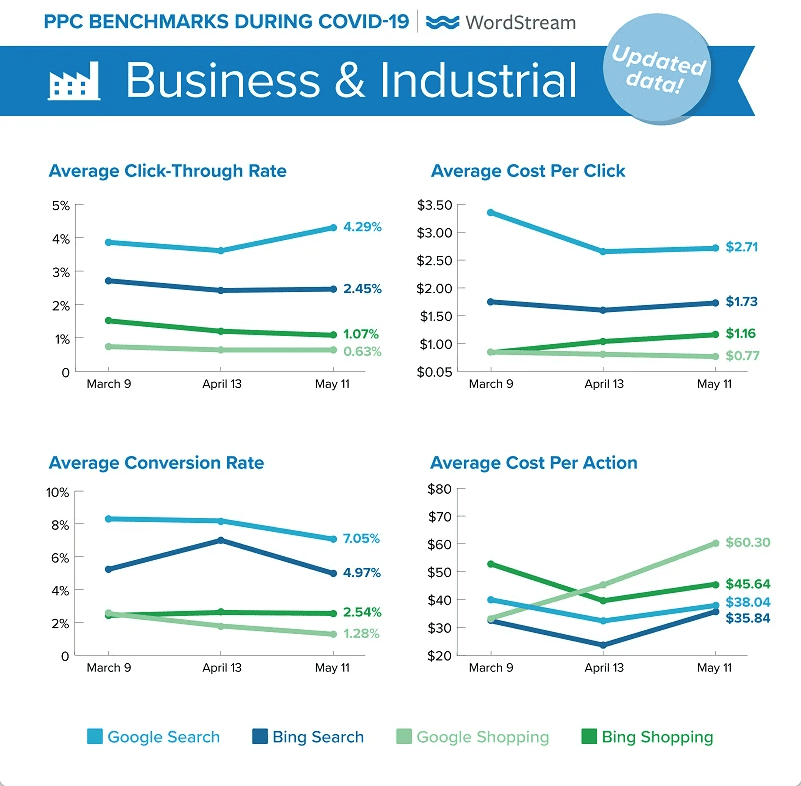
Google and Bing Search Ads: Average Cost Per Click, Click-Through Rate, Cost Per Lead, and Conversion Rate by Industry

If you’re considering running Google or Bing search ads, you’ll want to first get an idea of what you can expect to pay for cost per click, click-through rate, lead cost, and conversion rate. These factors will play a large role in how much your ad campaign costs overall.

To help you get a sense of what’s possible in your industry, we’ve compiled the top 20 industries that run Google and Bing search ads (according to their own data). The data is broken down by industry so that you can get an idea of where you need to improve to stay competitive.

Also read: “The cost of Google Ads in 2022”

Pay only for interested leads

What is cost per lead?

Cost per lead, also known as cost per action, cost per conversion, or cost per acquisition, tells you how much you spent in order to get someone to complete a desired action—whether to fill out a form, call you, or make a purchase.

How much does it cost to get a lead?

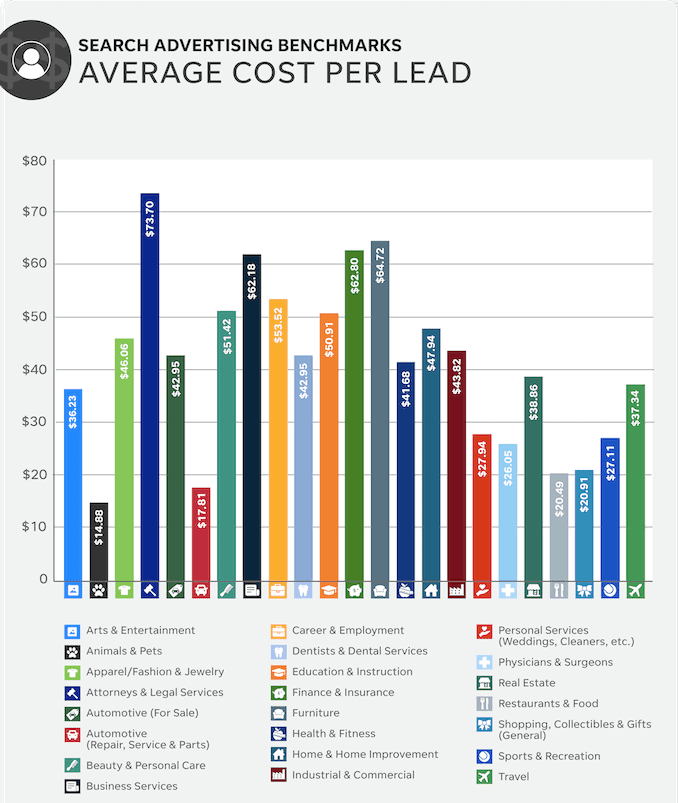
According to Wordstream market research, the average across all industries is $41.40. This overall average is lower than what we’ve seen in the past, which is good news for advertisers. The automotive vertical has consistently been in the lowest bracket in our past findings.

Which industries have the highest cost per lead?

Industries with the highest cost per lead include attorneys and legal services ($73.70), furniture ($64.72), and finance and insurance ($62.80).

Which industries have the lowest cost per lead?

Industries with the lowest cost per lead are animals and pets ($14.88), automotive repair, service, and parts ($17.81), and restaurants ($20.49).


average cost per lead

Which industries have the highest conversion rates?

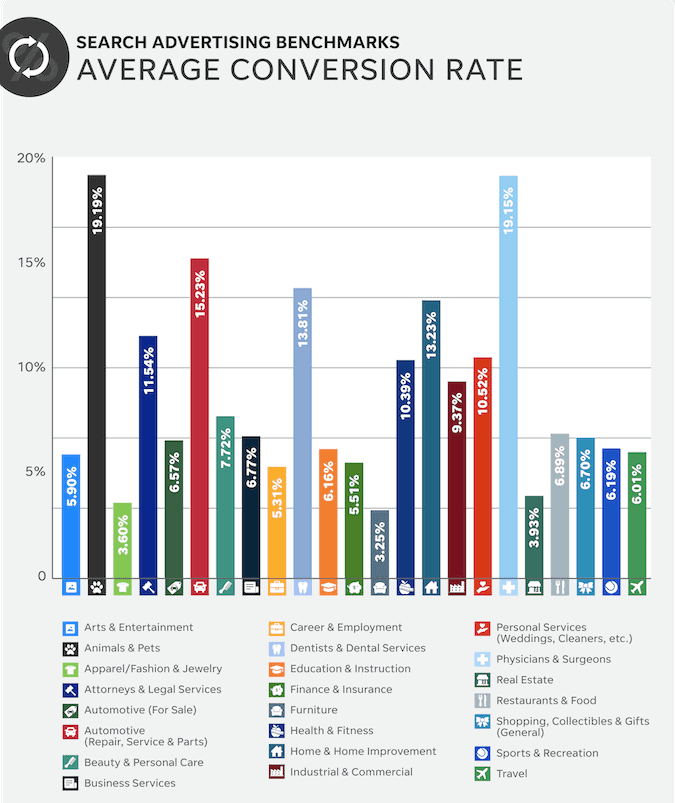
The conversion rate of an ad is the number of people who clicked on your ad and then did what you want them to do (like contact you or buy something from your site). This is one of the most important numbers you’ll ever look at, because it tells you whether your marketing dollars are being spent in a way that creates value for your business.

We found the average conversion rate across all industries to be 8.82%, ranging from 3.25% to 19.19%.

Industries with the highest conversion rates include animals and pets (19.19%), physicians and surgeons (19.15%), and automotive repair, service, and parts (15.23%). Industries with the lowest conversion rates were furniture (3.25%), apparel/fashion and jewelry (3.6%), and real estate (3.93%). Our past data also finds the highest conversion rates in the legal and automotive verticals and the lowest in real estate and apparel.

On the other hand, the personals conversion rate has historically been higher than what we’re seeing here.

average conversion rates

I am not a marketer, I run a business, so how can I do both successfully?

You’re not alone. You think you’re the only one who’s ever been through this, but we’ve heard from many business owners just like yourself.

You’ve built your business on passion and hard work, so it can be a rude awakening when you realize that you need to give all that same passion and attention to crafting an effective marketing strategy.

For a lot of people, it’s especially hard because they don’t have a background in marketing—they’re just business owners. But the good news is, we can not only help you with that, we can also help turn you into a marketer who happens to own a business.

Here’s how:

Three Words: “Standard Operating Procedures”
We have been developing and using our marketing SOPs to great success. Our SOPs provide you with step by step instructions that make setting up effective ads simple and straight forward. They are easy to follow even if you are a beginner or don’t have any experience in creating Facebook or Google ads.

Our SOPs come with detailed instructions on how to set up your ads, tricks of the trade that save you time, money, frustration and improve your results. We have been working with different audiences over the years and have tested what works best for your market.

SOP 047: How to Create a Lead Generation Landing Page

Like to know more? Click this link 

Dedicated To Your Marketing Success

John
wollongong digital marketing

Reasons Why Your Google Ads Don’t Work & How To Fix ’em

Reasons Why Your Google Ads Don’t Work & How To Fix ’em

The Ugly Side

You have a handsome face, you have a beautiful smile …but what you have with your Google Ads is nothing short of ugly! Yeah, I know — your Google Ads don’t work for you either. To save you the trouble of digging up those unsightly stats, we’ve found some of the most likely reasons and how to fix them, to help you prevent death by advertising fatigue (or just make sure you don’t enter it in the first place)…

No, your Google ads aren’t broken. It’s not you, it’s Google… Well, maybe it’s you. Maybe your Google Ads aren’t showing for a number of reasons unrelated to the quality of your ads, landing pages, ad groups, etc. In other words: Even if you’re doing a stellar job of adhering to Google Ads best practices, there are still plenty of reasons as to why your Google ads may stop showing. Here’s eleven of the most probable causes…

Non performance issues

1. I noticed that you tried to pay for Google ads with Monopoly money.

If you’re paying for your Google Ads account via automatic payments, Google will charge you when (1) you reach your pre-set payment threshold or (2) your current billing period ends.

It depends on which happens first. Obviously, in order for these transactions to go smoothly, the payment information linked to your account needs to be valid and up-to-date. If Google can’t charge you, your ads won’t show up in the search results.

2. Your bids are either too high or too low to attract customers.

It might seem like your Google ads aren’t showing because you haven’t set them up properly, but it might also be that your ads are just straight-up not bidding high enough.

When you set up a Google Ads campaign, you have to set a daily budget. If the maximum cost per click (CPC) bid you set for a particular keyword exceeds the budget of the campaign it lives within, your ads won’t show for queries that match to that keyword. Make sure your account is free of these conflicts between campaign budgets and keyword bids.

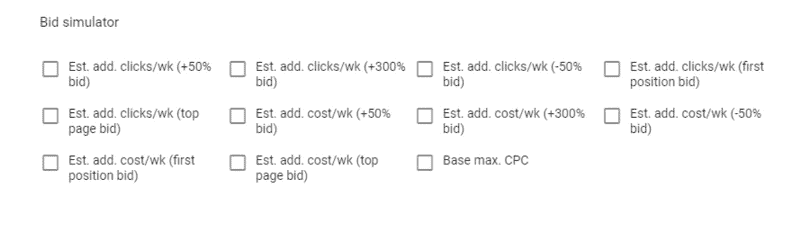
At the other end of the spectrum, your Google ads may not be showing because your bids are too low. Your ad rank for a given auction depends on your quality score for the keyword you’re bidding on as well as the bid itself. If you navigate to the Keywords section of your Google Ads account, you can use bid simulators to estimate the impact of increasing your bids by different amounts.

google ad bid simulator

3. Keyword search volume is too low, and Google rules our lives.

We’ve all been there. You were targeting a keyword that you were SURE was going to drive a lot of traffic and sales, but after your ads had been running for a while (and spending your budget), you found that… it just wasn’t happening.

It turns out that the keyword you chose just didn’t get enough search volume each month to really make an impact on your sales. So, Google decided not to run the ad anymore.

Now what? Well, I hate to say it, but waiting is probably not your best bet. Search volume might increase later on down the road, but if you can’t afford to wait or if you need results ASAP, I’d suggest looking into similar keywords with higher search volume. Google’s Keyword Planner in your Ad account or a Free Keyword Tool like Ubersuggest are great resources for this!

>>Refer to our SOP’s library<< 

4. Oh no! my ads not worthy!

Did you know that Google is actually really picky? It’s a bit of a diva, really. One day it loves your ads, and the next, it decides to stop showing them. There are a few reasons why that could be happening.

It’s possible that your Google ads have been paused—or that the ad groups or campaigns that house them have been paused. If this is the case, all you need to do is switch them from Paused to Enabled.

Alternatively, your ads may not be showing because they—or their corresponding ad groups or campaigns—have been removed from your account for one reason or another. Unfortunately, if this is indeed the case, you’ll have to start from scratch.

To see if you’ve accidentally paused or removed anything within your account, simply navigate to Change History. This way, you can see the changes that have been made to your account and filter by Status.

Or maybe they’ve been disapproved.

It sounds obvious, but sometimes we overlook it when trying to troubleshoot our ad campaigns. Any ad that has been disapproved is ineligible to show to users. To fix any disapproved ads and get them back on the SERPs, you can check out Google’s ad policies for help.

5. My Ads campaign has a scheduling or targeting error.

So, you’ve set up your Google Ads campaigns, and they just aren’t showing—even though your ads are fully approved.

Maybe you’ve checked your budget (it’s fine). Maybe you’ve read every one of the [number] reasons your Google Ads aren’t showing.

And maybe—just maybe—you’re still a little stumped.

You may be running into this problem because of two settings you can find in the Settings section of each campaign: Ad Schedule and Location targeting.

Ad Schedule

Just as you set a budget for each of your Google Ads campaigns, you also set an advertising schedule for each campaign—thus allowing you to tell Google which days of the week and hours of the day you’d like your ads to show. Navigate to the Ad Schedule tab of the campaign you’re concerned about and make sure your ads aren’t scheduled too narrowly.

Location Targeting

Next to that Ad Schedule tab you’ll also find the location targeting parameters for your campaign. It’s possible that your Google ads aren’t showing simply because there’s not enough keyword search traffic coming from the geographic region you’re targeting. Fix that by broadening your target location!

6. Negative keywords are like antimatter in search marketing.

You want to know what’s a bummer? Negative keywords.

And I’m not talking about the “sad” kind of negative. I’m talking about the “not X,” “X-free,” or “no X” kinds of negative keywords—the type that keep your ad from showing for queries that are irrelevant to your product or service.

Let me give you an example. Say you want to advertise for a “free trial for CRM software.” You could set that as a broad match keyword with free CRM as the campaign-level negative keyword. But what if someone searches for, say, “free CRM?” That search won’t show your ad, even though it might be relevant to someone looking for a free trial of a CRM. Why? Because the negative keyword is overriding the active keyword.

Instead, you could switch from the broad match negative free CRM to the exact match negative [free CRM]. Doing so would allow you to advertise to users looking for a free trial of a CRM while simultaneously withholding your ads from users looking for a CRM that doesn’t cost anything.

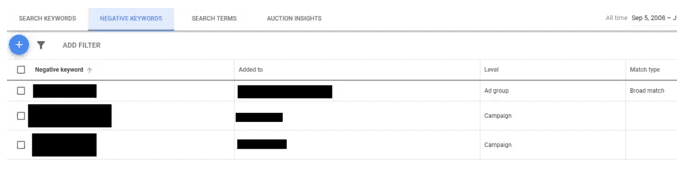
negative keywords

7. Your negative bid adjustments in your Ad campaigns are big enough to choke a horse.

You’re bidding yourself out of the race with your negative bid adjustments.

It’s easy to get carried away with your negative bid adjustments—but if you’re not careful, it could be costing you.

When you set up a Google ad campaign, you can apply negative bid adjustments to individual ads or ad groups. Setting these adjustments allows you to automatically decrease your bids for specific situations: If a user is on a mobile phone, for example, or if they’re searching within a certain time frame.

Unfortunately, it’s easy to get carried away with these adjustments and start bidding your ad rank into oblivion. If that’s what’s happening in your campaign, here are some easy ways to fix the problem:

Check your settings and make sure your negative bid adjustments aren’t too extreme. You want them to work for you, not against you!

—Look at the performance data for each adjustment and see if any are consistently underperforming. Those may need further adjustment or elimination altogether.

—Make sure your other bids are competitive enough to balance out the effect of the negative adjustments. You don’t want one part of your strategy pulling against another!

Performance issues (no not those types)

Sometimes, you’ll find that your Google ads aren’t showing because you’re not quite meeting Google’s standards when it comes to PPC best practices. In other words: There are times when getting your Google ads to show is a matter of optimization. That’s what we’ll be talking about for the remainder of this guide.

8. Your ad group doesn’t have a clear focus

Do you know why your ad groups are called ad groups? It’s because they are groups of ads.

And if you’re not happy with how your ad groups are performing, that means you’ve got the wrong ads in them!

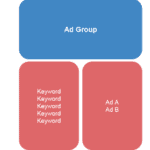
Your Google Ads account has lots of ad groups. Each one contains two components: keywords and ads. Those keywords and ads go together like peanut butter and jelly, or like a hot dog and a bun. And when one of your keywords is triggered by a user’s search query, Google knows to select one of the ads that you’ve tied to that keyword.

To get your ad groups working for you instead of against you, make sure each group is targeted towards a specific search query, product, service or market segment – basically, anything that sets one group apart from another.

google ad group

Your Google ads are like the mullet of hair styles: business in the ad auction, party in the landing page.

If your ads aren’t showing up in the Google search results, it might be because your ad groups aren’t focused enough. Basically, you’re trying to use a whole bunch of keywords that are only sort of related to one another. The reason this is a problem is that Google rewards relevant ads and penalizes irrelevant ones. In other words, if you want your ads to show up more often, you need to make them more relevant.

So how do you make sure your ad is relevant? You start by building ad groups comprised of closely related keywords. If the keywords within your ad group are closely related to one another, then it’s practically guaranteed that your ad will be relevant to the user’s query―no matter which keyword is triggered, no matter which ad is selected. Which means that if you want your ads to show up more often, focus on making sure each of your ad groups has a narrow focus.

9. Your ad copy isn’t as cool as it could be.

You should know that getting your ads to rank highly in the search results doesn’t start and end with creating focused ad groups. It’s just as important that you optimise your ad copy.

Fortunately, this is a bit more straightforward than optimising your ad group structure.

In a nutshell, optimising an ad to rank highly in the paid search results means incorporating your target keyword into your copy. By writing copy that includes your target keyword, you’re effectively telling Google that your ad is relevant to the user’s search query.

optimise ad copy

Let’s walk through an example. Say you sell dog food and dog snacks. You have an ad group with the keywords “dog food,” “dog snacks,” and “pet food.” But within that ad group, you only have one ad—and it doesn’t mention any of these keywords at all.

So even if Google is dying to show your ads, it can’t: It has no way of knowing whether or not your products align with what searchers are looking for.

The bottom line: If your ads aren’t showing, chances are you’re missing some relevant keywords in your copy.

10. Your landing page fell in a black hole.

Sometimes your landing page falls into a black hole. Not literally—but close enough. (refer to our Funnels SOPs)

When you have a subpar landing page, it’s like sending your landing page off into that black hole of no-man’s land, where it can’t be found. And if Google can’t find it, your ad won’t rank highly and you won’t get any clicks.

Essentially, if your landing page fails to help users do what they need to do—as signified by the intent behind their search queries—you’ll do poorly in the ad auction.

You need to look closely at each of the keywords you’re targeting with your Google ads. Think about the users whose queries are triggering these keywords. What are they struggling with? What are they trying to accomplish? What can you do to help them out?
Failing to answer these questions is like jumping off a cliff with no parachute. You’ll inevitably fall, and there’s nothing anyone can do about it. It’s also kind of like falling into a black hole (which is how your landing page ended up there).

11. Your click-through rate is low, which means people aren’t clicking on your ads.

What’s the difference between your ads and a cute dog? One of them is not getting any clicks.

If your ads aren’t showing, it might be because you’re not getting enough clicks. Google rewards advertisers who write ads that resonate with users. So, the lower your CTR for a given ad (or keyword), the worse you can expect to perform in the ad auction. If you want to give your ad a better chance of consistently showing to your prospects, you need to write copy that grabs their attention and compels them to click.

So, what are some ways to fix this? You can start by revising the text of your ad.
Try highlighting specific features or benefits in your headline or description lines and avoid using generic language like “Our product” or “We offer.” Specificity is key! It’s almost always better to have a targeted message than a generic one. Also try adding punctuation or special characters into your copy if appropriate—these small tweaks can help make an ad stand out from other results on a page.

You should also consider doing A/B testing (refer to our funnel SOPs) for different versions of an ad—give one set users some information about pricing while another group gets details about features instead. By doing this, you can see which messages resonate.

Bottom line? Write an ad that solves a problem.

This is the best way to ensure your ad will be clicked, and, most importantly, to maximise your return on investment in advertising.


Dedicated To Your Marketing Success

John

wollongong digital marketing

The Cost of Google Ads In 2022

The Cost of Google Ads In 2022

The cost of Google Ads is one of those questions that sounds simple. But the truth is, there’s no one answer—in fact, the price can vary wildly.

Google Ads is an auction-based system. As such, the cost of running Google Ads campaigns varies from industry to industry, and even from campaign to campaign. Because these variables aren’t set in stone, it can be hard to predict how much you’ll end up paying for Google Ads.

But don’t worry. In this guide, we’re going to cover all of the variables involved in Google Ads pricing so you can understand how much Google Ads will cost for your business and how to set a realistic budget.

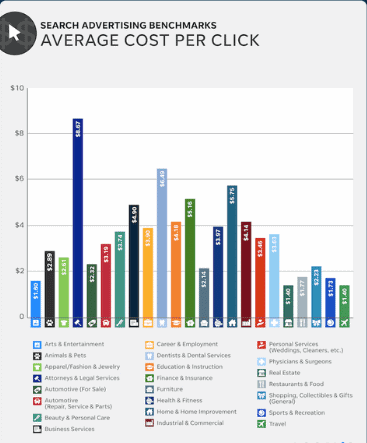
average cost per click

Factors That Help Determine Google Ad Prices

As mentioned above (and precisely why we’ve written this guide), there is no simple or one-size-fits all answer to the question of how much Google Ads will cost your business. Google Ads pricing varies depending on your industry, customer lifecycle, current trends, and how well you manage your account.

There are many factors that can influence the pricing of your Google Ads. Some have a bigger impact than others, but it’s important to be aware of them since they all work together to determine whether or not you’ll see a return on investment with your ad spend.

In this post, we’ll cover each factor in depth so you can better understand what determines the cost of running paid search ads on Google and how it affects your bottom line.

By Industry

The biggest influence on Google Ads pricing is industry. For example, the business services market segment, such as (legal, accounting, real estate, etc.) is one of the more competitive verticals in Google Ads, which generally translates to higher costs per click (CPC). This is due to the nature of the professional services industry: one new client could yield upwards of $1,000 – $10,000 depending on your business, so a CPC of $50 is a small price to pay for that client.

For businesses in the arts and entertainment vertical, their CPCs are relatively low in comparison to other verticals, but their conversion rates are also lower. To reach the $1,000 – $10,000 number, they need to reach a lot more customers.

Search ads benchmarks

The importance of customer lifecycle

You also have to take into account the lifecycle of your customer. For bigger ticket offerings, it takes longer for potential clients to move through the decision-making process, and your business needs to stay top-of-mind throughout that journey. This may involve multiple visits to your website, a content download or two, participation in a webinar, and more—before taking that final step.

Because of this, you likely won’t see a boatload of conversions at once—instead they will trickle in over an extended period of time. But your initial investment isn’t just going toward those conversions—it’s also an investment in additional leads and potential sales down the road.

Of course, if you’re selling something small like a t-shirt, odds are good that someone who sees your ad is going to buy it within seconds or minutes.

Trends

Neither consumer trends nor online advertising platforms are ever in a state of rest. It’s important to keep up with what’s going in your industry and within your niche—sentimentally and empirically. Take COVID, for example. At the height of the pandemic, average cost per click for the apparel industry was about $1.40. It dropped down to $0.70 in April when average conversion rates went up, and then ended up at $0.89 in May.

So much can impact your CPC, from seasonal events and holidays to competitor activity, economic shifts, and even public opinion about your brand or industry. You might have noticed that a lot of things are still up in the air these days, but one thing is certain: there’s a lot of opportunity for businesses to take advantage of reduced CPCs by increasing their marketing budgets.

Manage your Google Ads

Even if you’re pretty new to Google Ads, you’ve probably heard that Google Ads is the most powerful advertising platform out there. And the numbers back it up: a recent study by Google showed that the average ROI on Google Ads is 800%—that is, $8 for every $1 spent.

Of course, this all depends on how well you manage your account. You can’t just activate your ads and kick back. If you want to keep your Google Ads costs low and your returns high, you need to:


  • Keep a proper Google Ads account structure.
  • Report on your performance and make data-driven optimisations.
  • Maintain your keyword lists.
  • Perform regular account audits, and more.

How does Google Ads determine the price per click you will be charged when advertising with them?

The great part about Google Ads is that while it works as an auction, the winners aren’t chosen based on bid alone, and you don’t necessarily pay your maximum bid. How is this possible? Let’s take a quick run-through on how Google Ads determines the winners and what they pay per click.

Your Ads Quality Score

When a Google user searches for terms related to your business (a “query”), Google looks in its database to see if any advertisers are bidding on keywords relevant to that query. If yes, an auction is triggered and Google enters all relevant ads into the auction. Its first step in choosing a winner is to assign each ad a Quality Score.

When it comes to PPC (pay-per-click) advertising—and the resulting clickthrough rates and conversions—Quality Score is king.

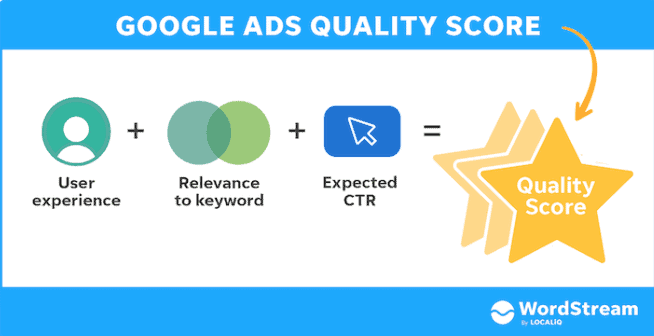
What Is Quality Score?

Simply put, Quality Score is a relevance metric used by Google to determine how well your ad copy and landing page match a given keyword. It’s then used to calculate your cost per click (CPC) and ad rank for that keyword. The higher your Quality Score, the better your ranking and the less you pay every time someone clicks on your ad.

It’s really that simple.

Google ads quality score

Ad Rank & How It Works

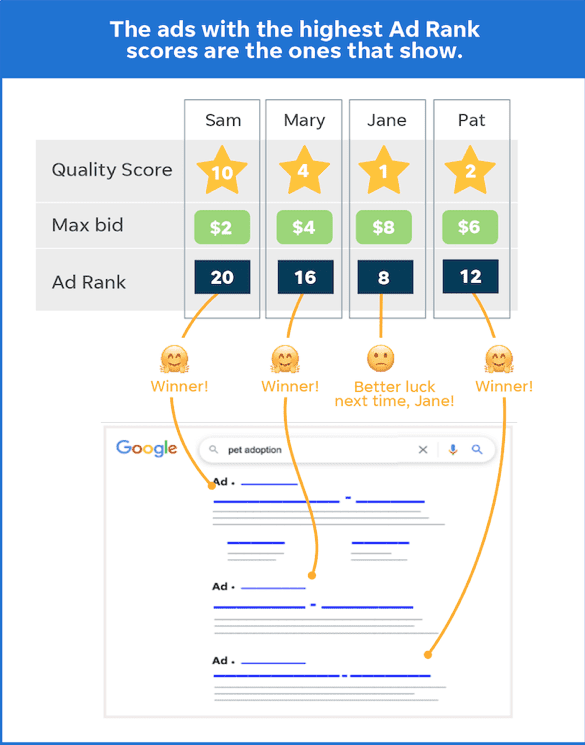
The next step is for Google to calculate each contending ad’s Ad Rank, which determines if and where your ad will be placed in the paid results section.

If you have a high enough Ad Rank, your ad will be placed in the paid results section of the search engine and show up when a user searches that keyword or phrase.

Ad Rank is determined by multiplying your Quality Score (based on the quality of your landing page, click-through rate, and other factors) by your maximum bid (the most you are willing to pay per click).

Ads with the highest Ad Rank get shown most often.

Google ad ranking

Cost per click (CPC)

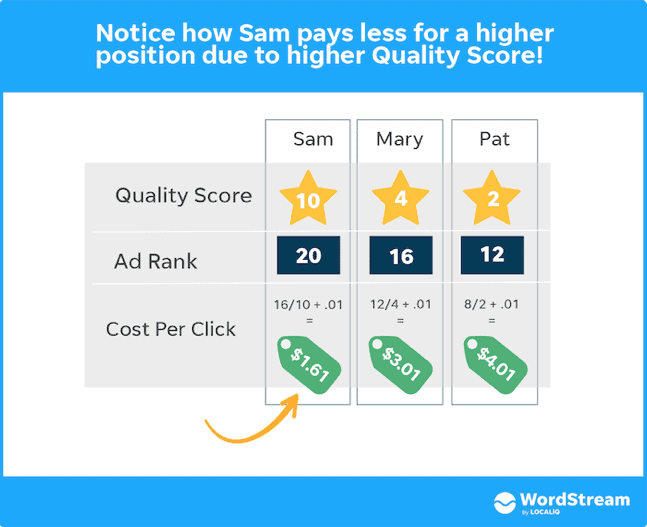
You can only pay for Google Ads if someone clicks on your ad. Depending on how much you bid and the quality of your ad, you may not have to pay your maximum bid. For example, if your bid is $1 and the ad below you has a lower Ad Rank than yours, you might only have to pay $0.50.

The Google Ads cost per click formula is: the Ad Rank of the ad below yours divided by your Quality Score, plus one cent. With this formula, an advertiser can pay less per click than another advertiser in the SERP (search engine results page) and still be in a higher position due to a better Quality Score. This lets advertisers with a small budget compete with big spenders on Google.

what is cost per click?

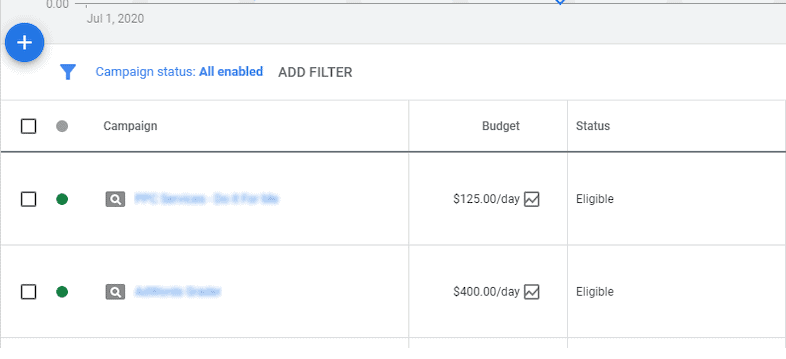
How does Google Ads budgeting work?

Google Ads budgets are often misunderstood. It’s not uncommon for advertisers to feel like their budget has been burned up in a matter of days, and to believe that Google Ads is prohibitively expensive. Here’s the thing: Google Ads isn’t necessarily expensive, but it is complex, especially when it comes to cost. So let’s set the record straight!

You’ve probably heard of Google Ads bids and budgets, but what do they really mean? Well, the amount you put into your budget is how much you’re able to spend on Google Ads. Your bid is the most you’re willing to pay for a click on your ad. If your ad participates in an auction, then Google takes out of your budget the amount that your bid was worth (or more). That amount is called your spend. The actual amount you end up paying for a click on your ad is called your cost.

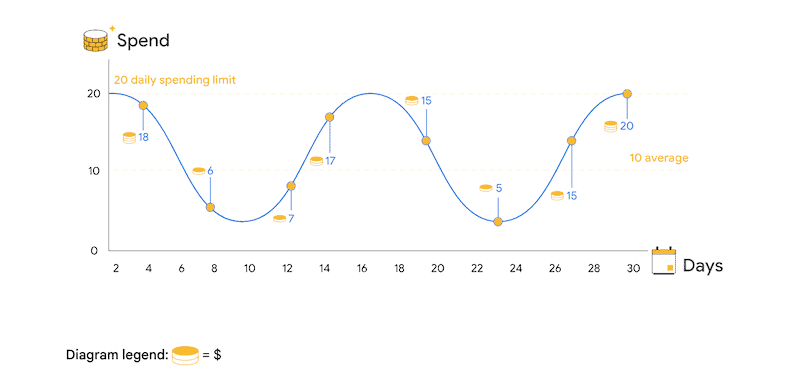
Set a daily average budget/and spending limits

Your daily budget is an average you’d like Google to spend on your ads each day.

Say you set a daily budget of $10 a day, but your campaign’s first ad costs $3.19 and gets clicked on 5 times. That’s fine! Google will not automatically stop showing your ad because it spent less than $10 in the first hour of that day—it still has plenty of time to figure out how best to spread the remaining $6.81 around those other 23 hours.

Of course, if your ads are getting a lot of clicks and conversions, they will likely exceed whatever daily budget you’ve set for them. In that case, it’s important to note that Google will never spend more than twice your daily budget in any given day.

Spending limits are the maximum amount you’ll ever pay for a click, a conversion, or an ad. The average daily budget is the average amount you want to spend on your ads per day.

Google Ads originally could spend up to 20% more than the daily average budget—until October 2017 when it announced it could spend up to 100% more of, or double, your budget—if it means more clicks or conversions. This means that if you set a daily average budget of $50, your daily spending limit is $100. You will never pay more in a day than your daily spending limit, and you will never pay more than a month than your monthly spending limit (your average daily budget x 30.4; although if you’re not paying for Google Ads with the invoice method, you can set a monthly spend limit at the account level).

google budget spend limits

Determine your average daily budget

If you have a budget you’d like to spend on a specific campaign over a specific amount of time, it helps to know how much you can spend each day. This is your average daily budget, and it tells you the average amount of money that can be spent per day on your campaign.

To calculate your average daily budget, simply take your budget for the month for that campaign and divide it by 30.4. What should your monthly budget be?

This depends on:

Your overall Google Ads budget.

The average cost per click of the keywords you’re bidding on (which you can get with Google Keyword Planner or any other keyword research tool).

The importance of that campaign relative to the others in your account.

For example, you may want to dedicate more budget to Campaign A, advertising your best-selling product, than to Campaign B, which promotes content to prospective customers at the top of the funnel.

Google's average daily budget

Bidding

When you use Google Ads, you will bid on how much you are willing to pay per click on your ad. This is called a bid. You can set your bids manually, or you can choose an automated approach.

If you set your bids manually, you set one maximum CPC (cost-per-click) for each ad group. You can also set different bids for each keyword in that ad group.

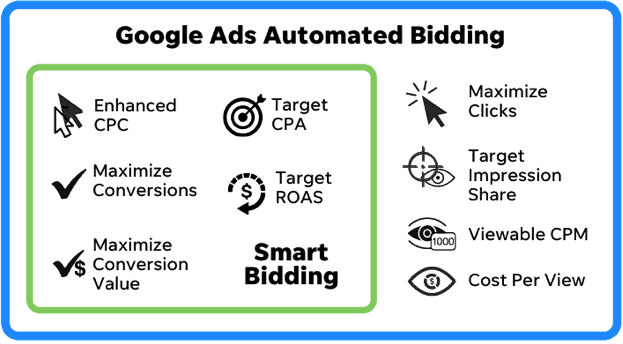
If you choose an automated approach, it means that Google will determine the best bid for your ads by looking at the behavior of users on the SERPs (search engine results pages). There are several automated approaches to bidding including maximize clicks and target impression share.
Many search engines have automated bidding options that help advertisers manage their campaigns.
Automated bidding helps advertisers reach their marketing goals more efficiently by using machine learning algorithms to adjust bids across their campaigns.

Google’s Maximize Clicks strategy aims to get the most clicks possible within your budget. Google predicts how many clicks you can get for each ad group and campaign in your account under a given budget, then adjusts your bid accordingly so that as many people as possible will see and click on your ads. You can set a target cost-per-click (CPC) based on the average CPC for a particular keyword or ad group. You can also set an average daily budget, which is the amount you want to spend daily over the course of an entire month.

Google’s Target Impression Share strategy aims to get as many impressions as possible at or above a target impression share rate (CPM). For example, if you have an impression share goal of 90%, your ads will be shown whenever they’re likely to get 90% of all possible impressions–not necessarily when they’ll get 90% of all paid impressions.

Google ads automated bidding

How much does a Google Ads click typically cost?

If you’re thinking about using Google Ads to promote your business, one of the first things you’ll need to know is how much does a typical click in Google Ads cost.

The key influence on pricing in Google Ads: keywords

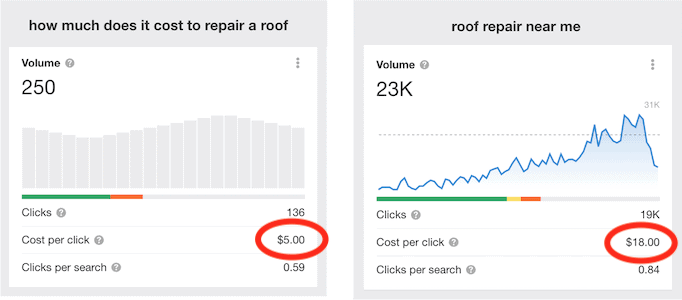
In some ways, you can think of PPC advertising roughly along the same lines as traditional print advertising; you’d expect to spend more on a glossy full-page ad in a national magazine than you would for a classified ad in a local newspaper. In digital marketing, however, the pricing isn’t influenced by the format of the ad, but rather the intent of and competition for the keywords you’re bidding on. So you can expect to spend more on a high-intent keyword like “roof repair near me” than something lower intent like “how much does it cost to repair a roof.”

Google Ads pricing

If you’re in a super-competitive market such as legal or accounting, clicks can get much pricier. Think about it: how many law firms do you think are advertising on Google?

We’ve pulled together some keyword benchmarks in Google Ads to give you an idea of how much a click can cost for your business.

So, what’s the average cost-per-click in Google Ads?

It depends on a lot of things… but overall, the average CPC in Google Ads is between $1 and $2. That’s on the Search Network. On the Google Display network, clicks tend to be cheaper, averaging under $1.

The price you pay for a click depends on (as mentioned before) your industry and what type of business you have. It also depends on if you’re using the Search Network or Display network—and even then, ad placement matters. If you’re using the Display network and your ads are showing up on YouTube videos or Gmail accounts, for example, you can expect to pay more than if your ads are appearing in banner ads on news sites or blogs.

If you want to get an idea of how much your campaign will cost you before you run it, use Google Ads Keyword Planner.

How much are you paying for clicks on long-tail keywords?

Google Ads can be expensive, especially for broad keyword categories. But if you’re looking to save money while still driving qualified traffic, long-tail keywords are your best bet.

The reality is, broad keywords only make up a small portion of total searches—long-tail keywords account for the majority. Even better? They’re generally cheaper than their shorter counterparts.

For example, if someone has an ant problem in their kitchen, “exterminator [their town],” is one search they might perform. “Exterminator” is a broad keyword with a volume of 97,000 and a cost per click of $16.00 in Ahrefs. But they might also search for “how to get rid of ants in the kitchen.” This is a long-tail keyword with a volume of 9,100 and a cost per click of $1.40—much lower. The intent may not be as strong, since they could be looking to DIY, but it’s still pretty strong, so they’ll likely be open to—or even click on—an ad for an exterminator.

Key points to remember

You’ve been here a while, and we just want to thank you for sticking around and learning so much about the cost of Google Ads.

In this guide, we’ve talked a lot about the factors impacting your cost of Google Ads, but let’s do a quick recap:

  • The cost of Google Ads depends on your industry, customer lifecycle, and current consumer trends.
  • Google Ads operates on an auction system that rewards high-quality ads with lower costs and better ad placement.
  • You can exercise tight control over how your Google Ads budget is spent by using tactics like ad scheduling, geotargeting, and device targeting.
  • The average cost per click in Google Ads is between $1 and $2 on the Search Network. The average cost per click on the Display Network is under $1.
  • The most expensive keywords in Google Ads and Bing Ads can cost $50 or more per click. These are generally highly competitive keywords in industries that have high customer lifetime values, like law and insurance.
  • The average small- to mid-size company spends about $1,000 to $10,000 per month on its Google paid search campaigns. That’s about $12,000 to $120,000 per year.

The point is, before you open a Google Ads account, take the time to figure out what your budget will be. It’s one of those things that’s not just going to magically appear; you need to know what it is before you get started. And if possible, spend some time thinking about future campaigns as well—it never hurts to have a little extra on hand for when an unexpected opportunity arises.

Need a hand? Try our SOP library or give one of our helpful team a call.

Dedicated to your success

John

Big Business vs Small Business Marketing

Big Business vs Small Business Marketing

Does Size Really Matter?


Well in marketing your small business, it most certainly does. In this article I’m going to show you one of the biggest marketing miscalculations made by small business when it comes to getting their message to their target market.

I can’t tell you how widespread this problem is, and it’s at the very core of why most small business marketing fails.

If you’re a small business owner, you’ve almost certainly given some thought to marketing and advertising, things like; What approach are you going to take? Where are you going to advertise? What are you going to say in your advertising? 

The most common way most small business owners decide on doing this is by looking at large, successful competitors in their industry and copying what they’re doing.

This seems a pretty smart thing to do right? Copy what other successful businesses are doing and you will also become successful?

But honestly, this is one of the quickest ways to fail and I’m very certain it’s responsible for the bulk of small business failures. Here are the two major reasons why I think that is..

Large Companies Have A Different Agenda


Large companies have a very different agenda when it comes to marketing than small businesses do. Their strategies and priorities differ from yours significantly.

The marketing priorities of a large company looks something like this:

  • Pleasing The Board Of Directors
  • Appeasing Shareholders
  • Satisfying Superiors’ Biases
  • Satisfying Existing Clients’ Preconceptions
  • Winning Advertising And Creative Awards
  • Getting “Buy In” From Various Committees And Stakeholders
  • Making A Profit

The marketing priorities of a small business look something like this:

  • Making A Profit

As you can see there is a world of difference in the marketing priorities of small and large companies. So naturally there is a big difference in strategy and implementation.

Big Companies Have A VERY Different Budget


Strategy changes with scale
. This is very important to understand.

Do you think, for example, a large property investment company has a different property investment strategy to the average small property investor? Of course they do..

The large company’s strategy simply won’t work on a small scale. You can’t just build one floor of of a skyscraper and leave it at that. You need them all.

If you have an advertising budget of  millions and years to get a profitable result, then that’s going to be a very different strategy to needing to make a profit immediately with a $5000 to $10,000 budget.

Using a large company marketing strategy, your $10,000 is going to be a drop in the ocean. It will be totally wasted and ineffective because you’re using the wrong strategy for the scale that you’re operating at.

Branding and ego-based mass marketing is the domain of large companies. To achieve any kind of cut through requires an enormous budget and the use of expensive MASS media.


So What’s left For The Little Guy?


Direct response marketing gives small businesses a way to compete on a small budget. It’s designed to be accountable and ensure you get a return on investment that is measurable.

Following the path of other successful businesses is smart, but it’s vital that you understand the full strategy you’re following and that you’re able to implement it.

Strategy from an outside observer’s perspective can be very different to the reality. If you’re following a strategy that has different priorities to you or has a vastly different budget then it’s highly unlikely it will generate the kind of result you’re hoping for.

Yours In Market Success

John

Thanks go to Allan Dib from Successwise for his insights

Future of Marketing, What Skills You Will Need?

Future of Marketing, What Skills You Will Need?

market research wollongong

How will marketing change in the coming decade?

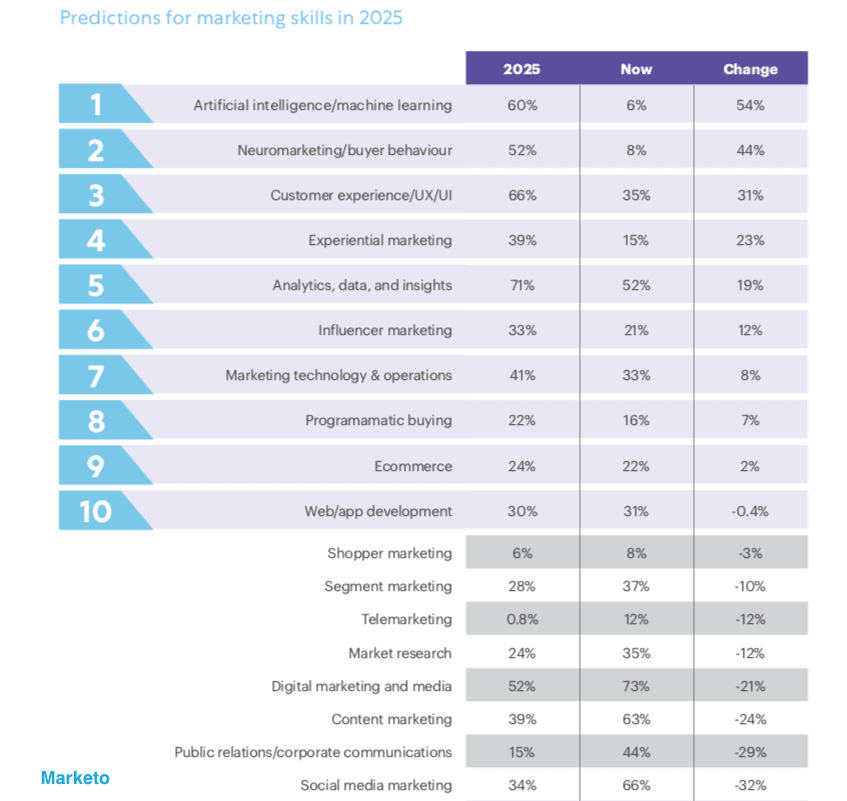
According to Adobe’s Marketo, “Niche marketing capabilities will become the most important skills. Current tasks performed by a marketing team will decline in importance or be automated into oblivion.”

In-demand marketing skills wollongong

Most In-demand

The marketer of 2025, will need skills that focus around analytics, data & insights, CX (customer experience)/UX (user experience), AI (Artificial Intelligence) & machine learning, Vanity metrics, which include impressions, “likes,” shares, comments, followers, open rates, views, traffic, time on site, bounce rate open rates etc.. digital marketing & media (though this is declining), and marketing technology & operations, marketing will essentially be a technology hub.

analytics marketing wollongong

Sophisticated Data Analytics

In fact, only analytics remains a top priority from the current crop of top four skills. They includes digital marketing and media, Social media marketing will halve and content marketing.

Sophisticated data analytics, will be the most important skill in the marketing.

To provide deeper, more advanced insight into patterns, trends, and themes that may be hidden within data. is a Data analysis that uses predictive modeling, machine learning algorithms, deep learning, business process automation.
neuromarketing wollongong

Neuromarketing

Neuromarketing is the study of customer behavior and how it affects the buying pattern of a target audience. For example, researchers may find that a particular stimulus causes a response in the brains of test subjects that’s correlated with a desired behavior (e.g. the release of a ‘feel good’ hormone). Obviously, as a marketer, you’d want to know these cause-effect relationships so that you can apply the principles to your creative, and thereby drive improvements to your key conversion metrics.(Smart Insights)

marketing skills predictions wollongong

The marketing team of tomorrow, may not be recognised by the marketing team of today. Artificial intelligence and advanced data analytics will be the key tech drivers.  Neuromarketing, which barely exists today, will feature strongly. 

The day-to-day functions of marketers will change greatly. For instance, there will be much less emphasis on decisions around email marketing or social media. Rather, those kinds of tasks will be more and more reliant on machines to make better decisions than people make today.

Yours In Marketing

John

 wollongong digital marketing

Call Now Button